
A wall of dramatic before-and-after images makes weak evidence. One portrait becomes a comic panel, another turns into a product ad, and a third acquires cinematic lighting. The outputs may all be attractive, but they do not reveal whether an editor can change a requested detail without quietly redesigning the rest of the photograph.
A more useful benchmark gives Nano Banana one narrow job and measures what it leaves alone. Change the mug from blue to green; remove the cable behind it; move a cloud without touching the horizon. Local-edit quality is the combination of requested change and unrequested stability. A style gallery shows only the first half.
Discard the Style Gallery as a Benchmark
Style transformations are easy to admire because every difference looks intentional. If the face, fabric, shadows, and background all change together, there is no stable reference against which to identify collateral damage. The viewer is judging taste. An editing benchmark needs a preservation contract.
The contract begins with a sentence: “Only this element may change.” Everything else becomes an invariant. This does not require pixel-perfect identity, which would be unrealistic for a generative edit. It requires the reviewer to name which departures would make the result unusable for the job. A furniture retailer may tolerate a slightly different wall texture but reject a changed chair leg. A profile-picture editor may make the opposite trade.
Run several narrow edits on the same source rather than one spectacular edit on several unrelated sources. Repetition exposes whether a tool’s preservation behavior is dependable enough for a workflow, and it stops a favorable source image from carrying the whole demonstration.
Prepare a Source with Expensive Details
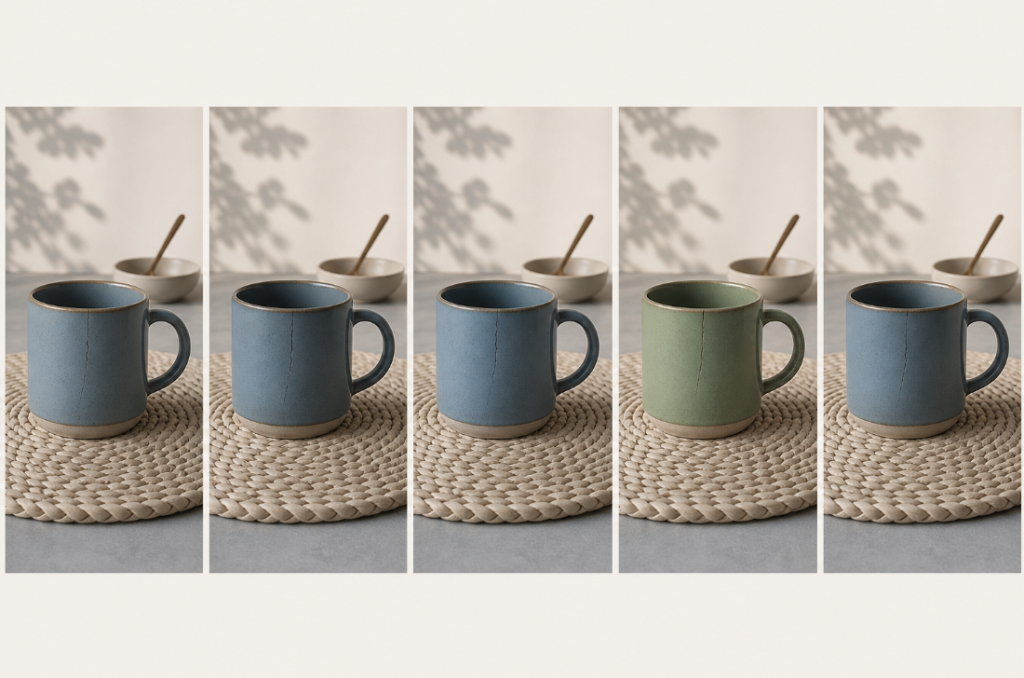
Choose a photograph that contains details the job cannot afford to lose. A useful source might show a ceramic mug with a hairline crack, a woven placemat, a window reflection, and a soft shadow crossing the table. The requested edit can be simple—change the mug color—but the surrounding evidence makes careless regeneration visible.
A blank product cutout on white is a poor first benchmark. It may be easy to edit, yet it places little pressure on geometry, texture, or light. Start with a normal production image. Keep its original resolution and an untouched copy, then define the region of interest in ordinary language before opening Kimg AI.
The source also needs a known purpose. If the image will become a 300-pixel marketplace thumbnail, tiny weave changes may not matter. If it belongs in a restoration archive, any invented surface detail may be unacceptable. A pass condition without a destination tends to become a zoom-level argument.
Write one rejection example before the run. For the mug scene, it could be: “Reject if the crack moves, because the listing describes that exact handmade piece.” This sentence connects a visual invariant to a consequence and prevents reviewers from relaxing the rule after seeing an otherwise attractive output.
Write a One-Variable Editing Instruction
Kimg AI’s current image-to-image route accepts a source and a prompt, which is enough to run a bounded edit. Describe the requested change first, then list only the invariants that carry business value. “Make the mug green; preserve its crack, handle shape, shadow, window reflection, and every other object” is testable. “Improve the photo while keeping it similar” is not.
Avoid mixing correction with art direction. Removing a cable and making the room feel warmer creates two variables: object removal and lighting change. When the result looks different, the reviewer cannot tell whether the warmth caused the geometry drift or whether the removal did. Split the requests and keep the accepted output of the first edit as a separate branch.
Record the source, selected model, exact prompt, output size, and accepted result outside the image itself. These are reproducibility notes, not a claim that Kimg AI provides formal version control. A plain worksheet is sufficient if it lets a second reviewer trace which instruction produced each candidate.
Inspect Five Invariants Before the Requested Change
When checking a Nano Banana AI output, reviewers naturally look at the changed object first. Reverse that order. Hide the edited region and inspect the subject boundary, neighboring geometry, lighting direction, repeated texture, and background inventory. Only after those five checks should the requested change receive a score.
Subject boundary. Look for a shifted handle, softened edge, or new gap where the edited object meets its surroundings. These errors often remain visible at delivery size even when fine texture does not.
Neighboring geometry. Compare straight lines and occlusions around the edit. A removed cable should not bend the table edge behind it. A replaced sky should not trim the roofline.
Lighting direction. Check whether highlights and shadows still describe one scene. A green mug that receives a new frontal highlight while its shadow remains side-lit has changed more than color.
Repeated texture. Brick, fabric, hair, and foliage reveal patches quickly. Repetition should continue through the repaired area without cloning an obvious motif.
Background inventory. Count small objects before and after. Generative edits sometimes remove or substitute an item that was never mentioned. A missing spoon can matter more to a product set than a minor tonal shift.
Now reveal the edited region and judge whether the instruction was completed. This review order prevents a successful color change from distracting the team from a newly distorted handle. It also produces a useful failure report: “color passed; geometry and highlight invariants failed” is actionable.
Use two viewing sizes for the verdict. Begin at the actual delivery size, where a defect either affects the audience or disappears. Then inspect the suspected area at 200 percent to locate its cause. Do not reverse that order. Extreme zoom can turn harmless generative texture into a crisis, while a one-pixel silhouette notch may remain obvious in a small marketplace tile. Record both observations separately: “visible at delivery size” and “visible only under inspection” lead to different production decisions.
Repeat Only Around the Failure Boundary
If an edit passes all five invariants, move to a slightly harder request on the same source. If it fails one invariant, try a more explicit preservation instruction with Nano Banana Pro AI. If it fails several unrelated invariants, stop polishing that output. A second prompt may help, but the current result has already crossed the useful repair boundary.
Run the sequence across three ordinary photographs before drawing a conclusion. One image may flatter the model; one may expose an edge case. The benchmark is not a leaderboard score. It is a decision about which classes of edit can enter a real production queue and which still require conventional retouching.
Keep the narrowest promise the evidence supports. Perhaps the workflow is dependable for isolated color changes but not object removal near patterned fabric. That finding is more valuable than a gallery that makes every capability look equally mature. A trustworthy AI editor is not the one that changes the most. It is the one whose side effects a team can predict before the file reaches a client.